Welcome to easy PowerBuilder pasting!
Current version 20.0 - download
Recent Changes
- Appeon PowerBuilder 2019 and Appeon PowerBuilder 2019 R3 support.
- Please note: there is no update path for single user licenses from any prior version of SmartPaste to SmartPaste 20.0. SmartPaste company licenses can be updated for half the price of the full product. For details, please visit the purchase area
Basics - How does SmartPaste work?
SmartPaste is a tool that inserts pieces of text into the active PowerBuilder script painter. Just by one mouseclick you get headers, get- and set-functions and much more automatically pasted into PowerBuilder.
All the text that can be pasted is fully configurable using a macro editor.
These macros can include information about the current script like the name of the function, the parameter list, the return value and more.
Above all that, macros also can include navigation macros, so you can for instance move to the start of the script before you paste some text or can move the cursor to where you think editing will continue after pasting the text.
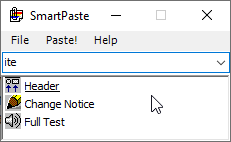
SmartPaste main window
Want to know more? Read the online version of the help file.
Give it a try, you will see how fine it works. Download from here.
| ||||
| ||||
carefully handcrafted tools | ||||
| ||||